
The Conversion Report You're Already Sitting On
Most store owners treat their support inbox as a cost centre - something to manage, minimise, and respond to as quickly as possible. But there's a completely different way to read it, and it's one of the most underused tools in ecommerce conversion optimization.
Every message in your inbox is a data point. Not just a question that needs answering - a signal that something in your customer journey caused a shopper to stop, hesitate, and reach out before they could buy. That hesitation is costing you sales, often in ways your analytics dashboard never surfaces.
The real question isn't how fast you replied. It's why they had to ask at all.
What Repeat Questions Are Actually Telling You
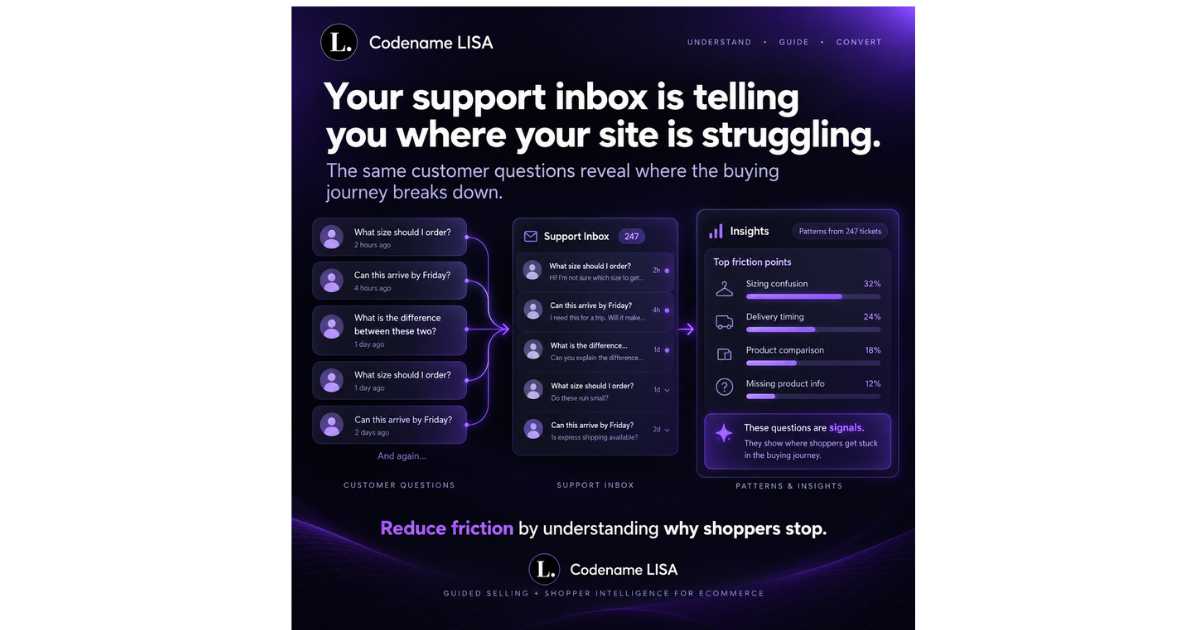
Open your support inbox and scan the last 50 messages. Chances are, you'll notice something uncomfortable: a lot of them sound the same. The same sizing confusion. The same delivery question. The same "what's the difference between these two products?" arriving week after week.
That repetition isn't coincidence - it's a pattern. And patterns in support tickets are almost always pointing at a specific page, a specific product, or a specific gap in the information your store provides.
The Questions Nobody Asks Are the Real Problem
Here's the harder truth: for every shopper who sends a message, a much larger number had the same question and simply left. They didn't ask. They didn't wait for an answer. They went somewhere else.
Research consistently shows that the majority of shoppers who encounter friction won't contact support - they'll abandon. According to Forrester, 53% of US adults are likely to abandon their online purchase if they can't find a quick answer to their question. Your inbox only captures the minority who persisted. The silent majority voted with their feet.
This is why the silent customer is actually your biggest problem - not the one who complained, but the one who didn't and never came back.
Turning Inbox Patterns Into Conversion Wins
Once you start reading your support tickets as a friction map, the next step is acting on what you find. This is where most stores stop short. They answer the question, close the ticket, and move on - without addressing the underlying gap that caused it.
Map Questions Back to Pages
Every frequently asked question belongs somewhere specific on your site - and right now, it probably isn't there. A sizing question belongs on the product page, ideally with a clear size guide or a visual comparison. A delivery question belongs at checkout, but also on product pages before the shopper even gets that far. A "which product is right for me?" question is a product finder waiting to happen.
When you treat each question category as a page-level problem, you start solving for the shopper who never reaches out - the silent one who just leaves.
Look for Confusion Between Products
One of the most common support patterns is shoppers comparing two similar products and not knowing which one to choose. This is a particularly expensive friction point because those shoppers are often high-intent - they want to buy, they just don't know what. A personalized shopping experience that guides them to the right option in real time converts those moments instead of losing them.
This is exactly where answering questions after the fact still loses sales - because by the time you reply, the shopper has already decided.
Why Speed of Answer Is the Wrong Metric
There's an entire industry built around measuring support response time - first reply time, resolution time, customer satisfaction scores. These metrics matter. But optimising for them alone is solving the wrong problem.
If your average response time drops from 4 hours to 1 hour but the same questions keep arriving, you haven't fixed the friction. You've just become faster at patching it. The conversion problem - the shopper who asked and then didn't buy while waiting, or the one who never asked at all - remains completely untouched.
The shift that matters is moving from reactive support to proactive friction removal. That means addressing the question before the shopper has to ask it - on the product page, during browsing, at the moment of decision.
How AI Changes This Equation
This is where automated customer service for online stores stops being just a cost-saving tool and becomes a genuine conversion strategy. An AI shopping assistant for ecommerce doesn't wait for a shopper to send a message. It engages while they're still on the page - answering sizing questions, explaining product differences, surfacing delivery information - in the moment when the answer can actually change the outcome.
But the smarter play goes further. The right AI doesn't just answer questions - it tracks which questions are being asked most often, on which products, at which point in the journey. That's the friction map your inbox has always contained, now surfaced automatically and acted on in real time.
This turns what was previously a support cost into an ecommerce conversion optimization AI tool - one that identifies gaps, closes them proactively, and captures shoppers who would otherwise have left in silence.
Proactive Beats Reactive, Every Time
When a shopper is hovering on a product page, comparing two options, or spending longer than usual reading the description, those are buying signals wrapped in hesitation. Responding to those signals in real time - with relevant information, a well-timed recommendation, or a direct answer to the question they haven't typed yet - is a fundamentally different experience from waiting for a ticket to arrive.
Stores that make this shift stop reducing cart abandonment through recovery emails and start preventing it at the source. That's a completely different category of result.
Start With What You Already Have
You don't need expensive new analytics tools to start this process. Your support inbox, your live chat logs, and your returns data are already telling you where your store is struggling. The work is in reading them differently - not as a queue to clear, but as signals from customers about what your store isn't communicating clearly.
Categorise a month's worth of support tickets by topic. Map each category to a page or product. Prioritise the most frequent patterns. Then ask: could this have been answered before the shopper reached out?
In most cases, the answer is yes. And in most cases, the fix exists - it just hasn't been built yet.
LISA: Built to Surface and Solve Friction
LISA does both sides of this work. On the front end, she answers shopper questions in real time, guides product decisions, and removes the hesitation that sends shoppers to your inbox - or out of your store entirely. On the back end, she tracks the patterns behind those interactions, so you can see exactly where friction is concentrated and what it's costing you.
That combination - proactive conversation plus friction analytics - is what separates a genuine AI shopping assistant for ecommerce from a basic chatbot. One answers questions. The other eliminates the reason they're being asked.
If you want to see how LISA would work on your ecommerce store - and what your current friction patterns are costing you - book a demo. We'll show you exactly what LISA sees when she looks at your store.